Trust Call: Caller ID & Block
Maxify GlobalCommunication
0.00.00 Reviews
- Version
- 1.8
- Installs
- 10.00M
- Age Rating
- Everyone
Screenshots
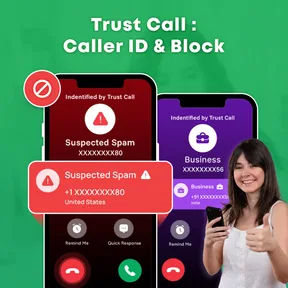
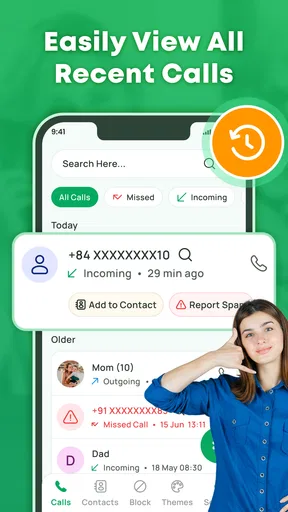
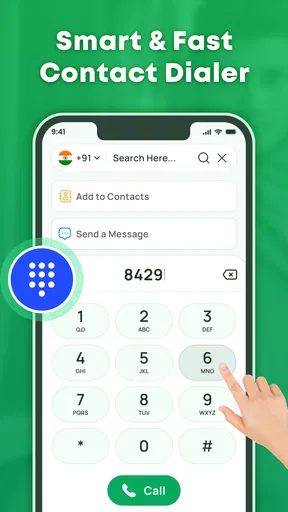
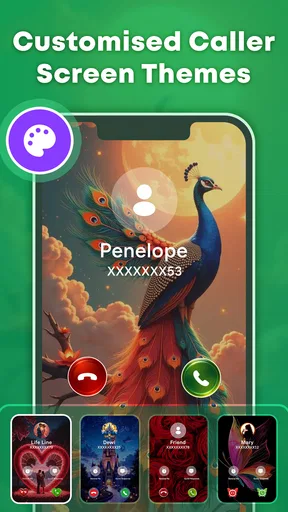
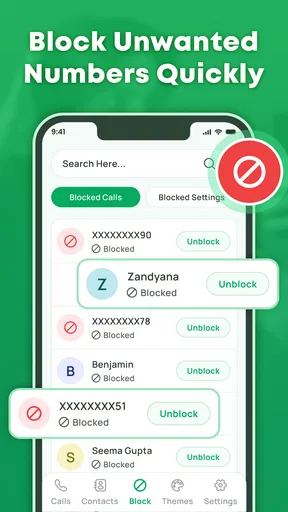
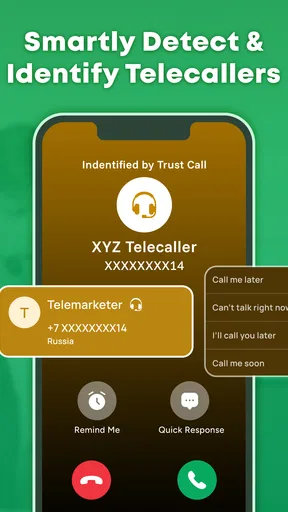
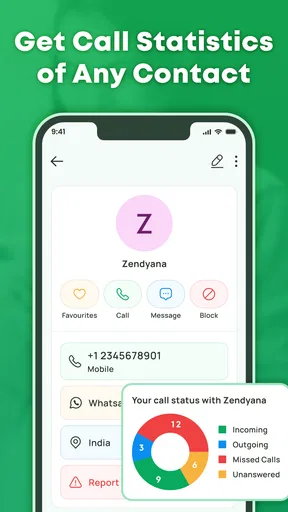
Our Review of Trust Call: Caller ID & Block
 Analysis by Appyee
I spend a lot of time deciding whether a caller ID app is genuinely useful or merely another layer between me and the phone’s normal call screen. Trust Call: Caller ID & Block, from Maxify Global, takes a focused approach: it is a communication app built around recognizing unfamiliar numbers and helping users deal with unwanted calls. That narrow purpose makes it easy to understand, but the real question is how comfortably it fits into everyday calling, especially for people who need clear, low-effort interaction.
In my experience, the app makes the most sense for anyone who regularly receives calls from numbers they do not recognize. It can be useful for people who are cautious about answering unknown callers, users who want a simpler way to manage interruptions, and households where identifying a caller quickly matters. It is free, rated for Everyone, and supports devices running Android 8.0 or later. Maxify Global lists it at version 1.8, and its presence on more than ten million devices suggests that the basic problem it addresses is familiar to a large audience.
How Trust Call handles the first few seconds of an unknown call
The strongest part of Trust Call: Caller ID & Block is its direct purpose. Instead of presenting itself as a full messaging suite, dialer replacement, or social communication platform, it concentrates on the moment when a call arrives and I need to decide what to do. Is this likely to be someone relevant, or is it an interruption I should avoid?
That focus is valuable because unknown calls create a small but repeated decision problem. I may be expecting a delivery, a medical office, a school, or a repair service, while also dealing with robocalls and suspicious numbers. A caller identification tool can reduce the guesswork before I commit to answering. A blocking function adds a second layer by helping me prevent unwanted callers from taking up the same attention repeatedly.
The app’s store summary describes it as a smart caller ID and call blocker, and that combination is important. Identification alone still leaves me to make every decision manually. Blocking alone can be too blunt if I am waiting for a legitimate call from a number that is not saved. Used together, the two functions support a more measured routine: inspect unfamiliar calls first, then decide which numbers deserve continued access.
I would not treat it as a replacement for careful judgment. A recognized caller name is not automatically proof that a call is safe, and an unfamiliar number is not automatically harmful. The practical benefit is better context, not certainty. That distinction matters for anyone who may be pressured by urgent-sounding calls or who tends to trust whatever appears on screen.
Readability and navigation in ordinary use
For readability, the key advantage is that the app’s purpose is easy to understand. A person opening it is not required to learn a complicated productivity system or decode a large collection of communication tools. The central tasks are identifying calls and controlling unwanted ones. That limited scope can make the experience less mentally demanding than a crowded security or phone-management application.
I especially appreciate this kind of focused design when I am distracted. If my phone rings while I am cooking, carrying shopping bags, or helping someone else, I do not want to explore several menus before finding the relevant action. A caller ID and blocking tool should make the important information visible quickly, and Trust Call is aimed at that exact moment rather than at long sessions inside the app.
There is also a useful distinction between visual simplicity and actual accessibility. A clean interface can help people with attention difficulties or limited technical confidence, but it does not automatically solve every readability problem. Text size, contrast, spacing, and the clarity of labels still affect whether someone can act without hesitation. I would recommend checking how the app appears with the phone’s own display settings adjusted, particularly if standard text feels small or crowded.
For older family members, the app may be easier to explain than a more elaborate call-management service because the concept is concrete: see more context for an unknown caller and block numbers that should not keep returning. However, I would still demonstrate the workflow in person before relying on it. The difference between identifying a call and blocking it is important, and a user should feel confident about which action they are taking.
One practical tip is to decide on a personal rule before using the blocking feature. For example, I might identify a number first, avoid blocking it if I am expecting an important call, and only block it after repeated unwanted contact. This prevents the convenience of a quick tap from turning into an accidental barrier against a legitimate caller.
Motor and sensory considerations
Call management is often performed with one hand and under time pressure, so motor effort matters more than it might in a slower app. The most useful workflow is one that allows me to make a decision with a small number of deliberate taps. That is particularly relevant for people with reduced dexterity, tremors, temporary hand injuries, or difficulty performing precise gestures.
Trust Call’s narrow role should help keep the interaction understandable, but I would not assume that every action is equally easy for every user. Blocking a number is a consequential choice, so a large, clearly labeled control is preferable to an icon whose meaning must be guessed. If the phone is being used while walking or holding something else, confirmation language also matters: I should be able to tell whether I have only viewed information or actually changed the number’s status.
For users with low vision, the app’s usefulness depends on how well its visual information works with the phone’s own accessibility settings. Enlarged system text can improve recognition, but oversized text may also change how much information fits on screen. That trade-off is worth testing with a real incoming call rather than judging from a quiet setup screen.
People with hearing loss may find visual caller information more useful than relying on an audible ringtone or spoken announcement. Someone who cannot easily hear a phone in a noisy room can still look at the display and make a decision. On the other hand, visual identification does not replace a reliable vibration or notification setup, so the phone’s broader alert configuration remains important.
Users with color-vision differences should not have to depend on color alone to distinguish safe, unknown, or blocked calls. Clear words and recognizable controls are more dependable than red and green indicators by themselves. I would pay attention to that during initial use and avoid building a personal routine around color until I know that the labels remain understandable.
A less obvious benefit is the reduction in repeated cognitive work. Instead of remembering which unknown callers have already caused trouble, I can use blocking as an external reminder and control. That can be helpful for people who find repeated decisions tiring. The trade-off is that a blocked number may later become relevant, so periodic review of blocked contacts is sensible whenever the app provides that kind of management path.
Situational access: when the app is most useful
The clearest everyday scenario is a person waiting for a service call while receiving frequent interruptions. Imagine that I am expecting a technician but do not know the number they will use. Automatically rejecting every unfamiliar call would be risky. Caller identification gives me a chance to inspect the incoming number, while blocking remains available for callers that clearly do not belong in my day. In that situation, selective control is more useful than an aggressive “reject everything unknown” approach.
Another scenario involves a shared household phone. Different people may have different expectations: one person may want to answer unknown calls, while another may prefer to avoid them. A caller ID tool can support a conversation about how to handle unfamiliar numbers rather than leaving every decision to instinct. I would still make sure everyone understands that blocking is a household choice, not merely a visual cleanup of the call history.
The app can also help during work or study, when interruptions are costly. A quick look at caller information may let me postpone an irrelevant call without spending time answering and explaining that I am unavailable. For someone with attention-related challenges, reducing these unnecessary conversational detours can be as valuable as stopping the call itself.
For people who are vulnerable to scam pressure, the app is best used as a pause button. I would treat the displayed caller information as a reason to slow down, not as permission to share personal details. If a caller claims to represent a bank, government office, clinic, or delivery company, I would end the call and contact that organization through a trusted channel rather than relying solely on the name shown by the caller ID.
Situational access also includes environments where looking at a screen is difficult. If I am driving, working with machinery, caring for a child, or navigating a busy street, a caller ID app cannot make answering safe. In those moments, the right choice may be to let the call wait. The app can support later review, but it should not encourage interaction with the phone when attention belongs elsewhere.
People with limited data confidence may appreciate the app’s straightforward goal, yet they may also need reassurance about what each call-management action does. I would introduce it gradually: first observe identified calls, then learn the blocking control, and only later create a personal routine. That staged approach is less intimidating than changing several phone behaviors at once.
Where it fits beside the usual alternatives
The usual alternative is the phone’s built-in caller screen and manual blocking. That option has the advantage of familiarity and usually requires no separate learning. If I receive very few unwanted calls, manual controls may be enough. Trust Call becomes more attractive when unknown calls are frequent enough that I want dedicated assistance rather than repeating the same inspection and blocking steps by hand.
Another alternative is a broader security application that combines caller protection with identity monitoring, device scanning, or other privacy tools. Those suites may suit someone who wants one place for several protections. They can also feel excessive for a user whose only concern is unwanted calls. Trust Call’s communication-focused design is easier to justify when I do not want a large security dashboard competing for attention.
There is also the option of a full replacement dialer. A replacement can offer deeper control over contacts, call history, and the phone interface, but it may change habits that a user already understands. I would choose Trust Call over that route when I want targeted caller assistance without committing to a completely different calling environment. Conversely, someone who wants extensive customization may find a dedicated dialer more suitable.
The trade-off is that a focused caller ID app still depends on the quality and clarity of the information it presents. I would not install it expecting perfect classification or a guarantee that every unwanted call disappears. The right comparison is not “which app eliminates all risk?” but “which workflow helps me make safer, less stressful decisions with the least friction?”
Remaining barriers and sensible precautions
The biggest barrier is the possibility of overconfidence. Caller identification can make a number look familiar or trustworthy, but visual context should never replace verification. This is especially important for users who are easily rushed, have memory difficulties, or may interpret a displayed name as official proof. A simple personal rule helps: never disclose sensitive information solely because the caller ID looks convincing.
Another limitation is that blocking can create false positives. A legitimate caller may use a number I do not recognize, and a person who changes numbers may appear unfamiliar again. For that reason, I prefer selective blocking to broad rejection. If I am expecting an important call, I would keep unknown calls available until that situation has passed, then deal with persistent unwanted numbers afterward.
There is also a learning barrier for users who already struggle with phone settings. Adding a separate tool can be helpful, but it can also create uncertainty about which app controls the call. I would explain the difference between the normal phone app and Trust Call in plain language, then practice with a harmless example. The goal is confidence, not simply installation.
People using older supported devices should pay attention to how the app behaves alongside the existing phone software. Trust Call supports Android 8.0 and later, which covers a broad range of devices, but the experience can still vary between phone manufacturers and system interfaces. I would test the most important task—recognizing and handling an unfamiliar call—before depending on it for a vulnerable user.
Privacy-sensitive users should also think carefully about whether a caller identification service matches their comfort level. I would review the app’s permission prompts and privacy explanations during setup, understand what access is being requested, and avoid granting anything that does not make sense for the intended function. The free price makes trying it easy, but free does not remove the need for informed choices.
Finally, accessibility is not one feature that can be checked once. A person with low vision, hearing loss, limited dexterity, cognitive fatigue, or a different language background may experience the same call screen differently. I would judge Trust Call with the actual user, on the actual phone, in the environment where calls usually arrive. That is more reliable than assuming that a simple description guarantees an effortless experience.
My inclusive verdict
Trust Call is a sensible choice for users who want a focused way to understand unfamiliar calls and reduce repeated unwanted contact. I like that its purpose is easy to explain and that it can support a pause before answering. For people who benefit from visual context, fewer repeated decisions, or a clearer routine for handling nuisance callers, that focus may make daily communication feel more manageable.
It is not the right choice for someone seeking a complete phone replacement, advanced communication suite, or absolute protection from fraud. Users who rarely receive unknown calls may be perfectly comfortable with the built-in phone tools, while people who need extensive customization may prefer a more comprehensive dialer or security product. Trust Call works best when the problem is specific and the desired solution is equally specific.
My recommendation is to start cautiously: observe how caller information appears, learn the difference between reviewing and blocking, and create a personal rule for legitimate unknown callers. Keep verification habits in place, especially for financial or urgent requests. Used that way, the app can improve situational access without encouraging false certainty.
With a free model, an Everyone age rating, support for Android 8.0 and later, and a focused communication role, Trust Call is approachable for a broad range of users. Its value is not that it removes every difficult call; it is that it can make the decision around an unfamiliar number more visible and deliberate. For me, its strongest quality is giving people a clearer moment to choose rather than forcing them to react.
Verdict
Strengths of Trust Call: Caller ID & Block
- Identifies many unknown callers before you answer.
- Blocks reported spam and scam numbers automatically.
- Simple interface makes call screening easy to manage.
- Searches numbers to reveal possible caller information.
- Helps reduce interruptions from unwanted marketing calls.
Limitations of Trust Call: Caller ID & Block
- Caller identification may be inaccurate for private or new numbers.
- Some features may require a paid subscription.
- The app may need access to call-related personal data.
- Spam databases can vary by country and region.
- Background protection may increase battery and data usage.
Similar Picks in This Category
View All
Google Messages
Google LLC4.6

Gmail
Google LLC4.1

Google Meet
Google LLC4.4

Google Chrome
Google LLC4.1

WhatsApp Messenger
WhatsApp LLC4.6

Carrier Services
Google LLC4.2
Frequently Asked Questions
What is Trust Call: Caller ID & Block used for?
Trust Call: Caller ID & Block is designed to help identify incoming callers and reduce unwanted communication. It can provide information about unknown numbers, warn you about suspected spam or scam calls, and let you block numbers you do not want to hear from. Its usefulness depends on the available caller database, your device permissions, and the quality of information reported by other users.
Does Trust Call: Caller ID & Block automatically block spam calls?
The application may identify or filter calls considered suspicious, but automatic blocking behavior can depend on the settings you enable, your phone model, and the operating system version. After installation, review the call-blocking and notification options carefully. Some users may prefer warnings instead of automatic blocking, especially when they regularly receive calls from unfamiliar businesses, delivery services, or important contacts.
What permissions does Trust Call: Caller ID & Block require?
To identify and manage calls, Trust Call may request access related to your phone, contacts, call history, notifications, or the system’s caller identification and blocking features. These permissions are important for the main functions to work, but you should read each request before accepting it. If a permission seems unnecessary, check the app’s privacy policy and your device settings first.
Is Trust Call: Caller ID & Block free to download and use?
The app may be available to download without an upfront charge, while some features can require advertising support, in-app purchases, or a subscription. Before relying on premium tools such as enhanced caller identification, advanced blocking, or an ad-free experience, check the current listing in the Google Play Store or Apple App Store. Prices, trial periods, and available features can change over time.
Can Trust Call: Caller ID & Block protect me from every scam or unwanted call?
No caller-identification app can guarantee that every spam or scam call will be detected. Fraudsters frequently change numbers, use local-number spoofing, or call before a number has been reported. Trust Call can be useful as an additional warning and blocking tool, but you should still avoid sharing passwords or financial information, verify unexpected requests through official channels, and report suspicious calls when possible.
